Digital Slide Archive (DSA) Visualization Tutorial
Contents
Digital Slide Archive (DSA) Visualization Tutorial#
Welcome to the Digial Slide Archive (DSA) visualization notebook!
Digital Slide Archive (DSA) is a platform where you can manage your pathology images and annotations. A set of CLIs are available to help you convert your pathologist or model-generated annotations and push them to DSA. For more details on the DSA platform, please refer to their documentation.
In this notebook, we will use dsa and dsa_upload CLIs to convert your annotations to a DSA compatible format and to upload them to DSA. We support results from Qupath/Stardist dectection models (link to docker image), tile scores in a tabular format, and also expert annotations in geojson format. Here are the steps we will review:
Setup DSA
DSA Visuzaliation CLIs
Upload Qupath regional annotation results
Upload a heatmap generated from tile scores
Upload bitmasks PNGs
Upload bmp results
Upload Stardist object detection results
Upload Stardist cell detection results
[2]:
# TEMP
%env LUNA_HOME=/Users/rosed2/Documents/msk-mind/luna
%env PYTHONPATH=/Users/rosed2/Documents/msk-mind/luna/pyluna-pathology:/Users/rosed2/Documents/msk-mind/luna/pyluna-common:.
env: LUNA_HOME=/Users/rosed2/Documents/msk-mind/luna
env: PYTHONPATH=/Users/rosed2/Documents/msk-mind/luna/pyluna-pathology:/Users/rosed2/Documents/msk-mind/luna/pyluna-common:.
Setup DSA#
Before running this notebook, make sure you have your pathology slides organized in DSA under a collection/folder.
For one of our examples, we use an SVS image from TCGA. This image file in tcga collection, in slides folder on the DSA platform.
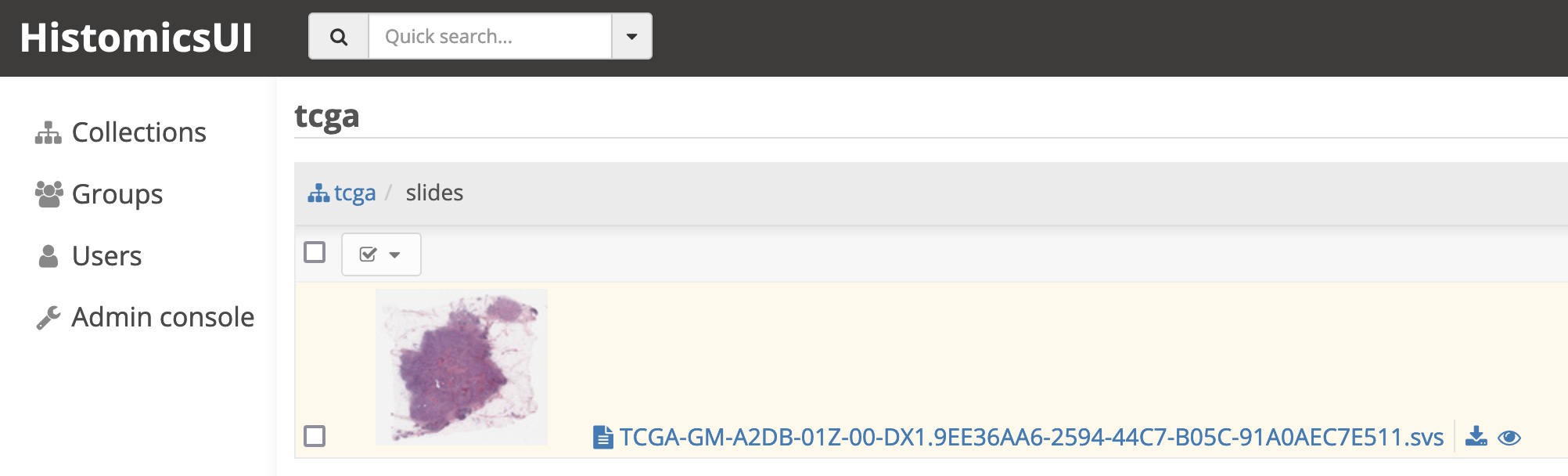
The collection name (e.g. tcga) and image file name (e.g. TCGA-GM-A2DB-01Z-00-DX1.9EE36AA6-2594-44C7-B05C-91A0AEC7E511.svs) on DSA will be used while uploading the annotations.
Be sure to modify the configuration files based on your DSA setup.
DSA Visualization CLIs#
Luna Pathology offers 2 CLIs to help convert your annotation results to a DSA compatible json format and to upload them to DSA. The conversion and upload is divided in to 2 separate steps, so each step can be parallelized based on your computing capabilities and DSA platform setup.
dsa [COMMAND] generates a DSA compatible annotation json.
dsa_upload uploads the DSA compatible annotation json.
Once upload is done, we print the link to HistomicsUI viewer, so you can easily navigate to the uploaded annotation result.
Note: Pushing and rendering a large number of annotation elements can take a long time. Please refer to DSA `documentation <https://digitalslidearchive.github.io/HistomicsTK/examples/tips_for_scalable_annotation_rendering>`__, for user expectations and some tricks for managing annotations.
For dsa_upload you can set credentials in environment variables, or pass in the username and passwords as parameters to the cli. For example, update your user credentials in the cell below:
[20]:
%env DSA_USERNAME=username
%env DSA_PASSWORD=password
env: DSA_USERNAME=username
env: DSA_PASSWORD=password
[21]:
# check available dsa cli commands
!dsa --help
2022-04-05 17:32:52,102 - INFO - root - Initalized logger, log file at: data-processing.log
Usage: dsa [OPTIONS] COMMAND [ARGS]...

  Convert segmentations, bitmasks, heatmaps to DSA annotation Json format.

Options:
  --help  Show this message and exit.

Commands:
  bitmask-polygon   Example: dsa bitmask-polygon '{"Tumor":...
  bmp-polygon       Example: dsa bmp-polygon results.bmp --output_dir...
  heatmap           Example: dsa heatmap score.csv --output_dir...
  qupath-polygon    Example: dsa qupath-polygon...
  regional-polygon  Example: dsa regional-polygon...
  stardist-cell     Example: dsa stardist-cell...
  stardist-polygon  Example: dsa stardist-polygon...
[35]:
# check dsa cli commands help messages
!dsa stardist-polygon --help
2022-04-05 10:36:47,657 - INFO - root - FYI: Initalized logger, log file at: data-processing.log with handlers: [<StreamHandler <stderr> (INFO)>, <RotatingFileHandler /Users/rosed2/Documents/msk-mind/luna/docker/luna_tutorial/vmount/notebooks/data-processing.log (INFO)>]
Usage: dsa stardist-polygon [OPTIONS] INPUT

  Example:

          dsa stardist-polygon
              ../dsa_input/test_object_classification.geojson
              --output_dir ../dsa_annotations/stardist_polygon
              --annotation_name stardist_polygon_segmentations
              --image_filename 123.svs
              --line_colors '{"Other": "rgb(0,255,0)", "Lymphocyte": "rgb(255,0,0)"}'
              --fill_colors '{"Other": "rgba(0,255,0,100)", "Lymphocyte": "rgba(255,0,0,100)"}'

Options:
  -m, --method_param_path TEXT  path to a metadata json/yaml file with method
                                parameters to reproduce results

  -fc, --fill_colors TEXT       user-provided line color map with {feature
                                name:rgba values}

  -lc, --line_colors TEXT       user-provided line color map with {feature
                                name:rgb values}

  -a, --annotation_name TEXT    name of the annotation to be displayed in DSA
  -f, --image_filename TEXT     name of the image file in DSA e.g. 123.svs
  -o, --output_dir TEXT         directory to save the DSA compatible
                                annotation json

  --help                        Show this message and exit.
[30]:
# check dsa_upload help messages
!dsa_upload --help
Traceback (most recent call last):
  File "/Users/rosed2/Documents/msk-mind/env/bin/dsa_upload", line 33, in <module>
    sys.exit(load_entry_point('pyluna-pathology==0.1.1', 'console_scripts', 'dsa_upload')())
  File "/Users/rosed2/Documents/msk-mind/env/bin/dsa_upload", line 25, in importlib_load_entry_point
    return next(matches).load()
  File "/usr/local/Cellar/python@3.9/3.9.9/Frameworks/Python.framework/Versions/3.9/lib/python3.9/importlib/metadata.py", line 77, in load
    module = import_module(match.group('module'))
  File "/usr/local/Cellar/python@3.9/3.9.9/Frameworks/Python.framework/Versions/3.9/lib/python3.9/importlib/__init__.py", line 127, in import_module
    return _bootstrap._gcd_import(name[level:], package, level)
  File "<frozen importlib._bootstrap>", line 1030, in _gcd_import
  File "<frozen importlib._bootstrap>", line 1007, in _find_and_load
  File "<frozen importlib._bootstrap>", line 986, in _find_and_load_unlocked
  File "<frozen importlib._bootstrap>", line 680, in _load_unlocked
  File "<frozen importlib._bootstrap_external>", line 850, in exec_module
  File "<frozen importlib._bootstrap>", line 228, in _call_with_frames_removed
  File "/Users/rosed2/Documents/msk-mind/luna/pyluna-pathology/luna/pathology/cli/dsa_upload.py", line 8, in <module>
    from luna.pathology.dsa.dsa_api_handler import (
  File "/Users/rosed2/Documents/msk-mind/luna/pyluna-pathology/luna/pathology/dsa/dsa_api_handler.py", line 13, in <module>
    import histomicstk
  File "/Users/rosed2/Documents/msk-mind/env/lib/python3.9/site-packages/histomicstk/__init__.py", line 7, in <module>
    from . import segmentation  # must be imported before features
  File "/Users/rosed2/Documents/msk-mind/env/lib/python3.9/site-packages/histomicstk/segmentation/__init__.py", line 15, in <module>
    from . import label
  File "/Users/rosed2/Documents/msk-mind/env/lib/python3.9/site-packages/histomicstk/segmentation/label/__init__.py", line 15, in <module>
    from .trace_object_boundaries import trace_object_boundaries
  File "/Users/rosed2/Documents/msk-mind/env/lib/python3.9/site-packages/histomicstk/segmentation/label/trace_object_boundaries.py", line 4, in <module>
    from ._trace_object_boundaries_cython import _trace_object_boundaries_cython
  File "_trace_object_boundaries_cython.pyx", line 1, in init histomicstk.segmentation.label._trace_object_boundaries_cython
ValueError: numpy.ndarray size changed, may indicate binary incompatibility. Expected 96 from C header, got 88 from PyObject
Upload a heatmap generated from tile scores#
heatmap option provides means to visualize your tile scores from your classification model.
The input here is a CSV file with a column of (0, 1) range and the tile coordinates. In this example, we visualize the “purple_score” column.
We use the color palette “viridis” where the output color ranges from purple to yellow, for scores from 0 to 1.
[2]:
# example CSV
!head -5 ../dsa_input/tile_scores.csv
address,coordinates,otsu_score,purple_score
x1_y1_z10,"(1, 1)",0.03125,0.03125
x1_y2_z10,"(1, 2)",0.0,0.0
x1_y3_z10,"(1, 3)",0.0,0.0546875
x1_y4_z10,"(1, 4)",0.0,0.0
[13]:
# example data_config
!dsa heatmap --help
2022-04-05 17:20:01,456 - INFO - root - Initalized logger, log file at: data-processing.log
Usage: dsa heatmap [OPTIONS] INPUT

  Example:

          dsa heatmap
              score.csv
              --output_dir ../dsa_annotations/heatmap
              --annotation_name heatmap
              --image_filename 123.svs
              --tile_size 256
              --column tumor
              --scale_factor 1

Options:
  -m, --method_param_path TEXT  path to a metadata json/yaml file with method
                                parameters to reproduce results

  -sc, --scale_factor INTEGER   scale to match image DSA. (default 1)
  -ts, --tile_size TEXT         tile size
  -a, --annotation_name TEXT    name of the annotation to be displayed in DSA
  -f, --image_filename TEXT     name of the image file in DSA e.g. 123.svs
  -o, --output_dir TEXT         directory to save the DSA compatible
                                annotation json

  --help                        Show this message and exit.
[15]:
# generate DSA annotation
!dsa heatmap ../dsa_input/tile_scores.csv \
--output_dir ../dsa_annotations/heatmap \
--annotation_name heatmap \
--image_filename 123.svs \
--tile_size 256 \
--column purple_score \
--scale_factor 1
2022-04-05 17:23:28,917 - INFO - root - Initalized logger, log file at: data-processing.log
2022-04-05 17:23:28,918 - INFO - luna.common.utils - Running <function heatmap_main at 0x12fef3e50> with {'output_dir': '../dsa_annotations/heatmap', 'annotation_name': 'heatmap', 'image_filename': '123.svs', 'tile_size': '256', 'column': 'purple_score', 'scale_factor': 1, 'input': '../dsa_input/tile_scores.csv', 'method_param_path': None}
2022-04-05 17:23:28,918 - INFO - luna.common.utils - Param column set = purple_score
2022-04-05 17:23:28,918 - INFO - luna.common.utils - Param tile_size set = 256
2022-04-05 17:23:28,919 - INFO - luna.common.utils - Param annotation_name set = heatmap
2022-04-05 17:23:28,919 - INFO - luna.common.utils - Param image_filename set = 123.svs
2022-04-05 17:23:28,919 - INFO - luna.common.utils - Param output_dir set = ../dsa_annotations/heatmap
2022-04-05 17:23:28,919 - INFO - luna.common.utils - Param input set = ../dsa_input/tile_scores.csv
2022-04-05 17:23:28,919 - INFO - luna.common.utils - Param scale_factor set = 1
2022-04-05 17:23:28,919 - INFO - luna.common.utils - Full segment key set: {}

----------------------------------- Running transform::heatmap_main -----------------------------------

2022-04-05 17:23:28,952 - INFO - luna.common.utils - Code block 'transform::heatmap_main' took: 0.032535148000000014s
2022-04-05 17:23:28,953 - INFO - luna.common.utils - Done.
[7]:
# push annotation to DSA
!dsa_upload http://localhost:8080/dsa/api/v1 \
--collection_name tcga-data \
--image_filename 123.svs \
--annotation_filepath ../dsa_annotations/heatmap/purple_score_heatmap_123.json
Usage: dsa_upload [OPTIONS]
Try 'dsa_upload --help' for help.

Error: Invalid value for '-c' / '--config': Path 'dsa_configs/dsa_config.yaml' does not exist.
Upload bitmasks PNGs#
Simple PNG bitmasks can also be visualized in DSA. Use bitmask-polygon option and provide pngs with the corresponding labels.
[18]:
# generate DSA annotation
!dsa bitmask-polygon \
'{"Tumor": "../dsa_input/Tumor.png"}' \
--output_dir ../dsa_annotations/bitmask \
--annotation_name bitmask \
--image_filename 123.svs \
--line_colors '{"Tumor": "rgb(255,0,0)"}' \
--fill_colors '{"Tumor": "rgba(255,0,0,100)"}'
2022-04-05 17:30:05,873 - INFO - root - Initalized logger, log file at: data-processing.log
2022-04-05 17:30:05,874 - INFO - luna.common.utils - Running <function bitmask_polygon_main at 0x13cd64dc0> with {'output_dir': '../dsa_annotations/bitmask', 'annotation_name': 'bitmask', 'image_filename': '123.svs', 'line_colors': '{"Tumor": "rgb(255,0,0)"}', 'fill_colors': '{"Tumor": "rgba(255,0,0,100)"}', 'input': '{"Tumor": "../dsa_input/Tumor.png"}', 'method_param_path': None}
2022-04-05 17:30:05,875 - INFO - luna.common.utils - Param fill_colors set = {'Tumor': 'rgba(255,0,0,100)'}
2022-04-05 17:30:05,875 - INFO - luna.common.utils - Param line_colors set = {'Tumor': 'rgb(255,0,0)'}
2022-04-05 17:30:05,875 - INFO - luna.common.utils - Param annotation_name set = bitmask
2022-04-05 17:30:05,875 - INFO - luna.common.utils - Param image_filename set = 123.svs
2022-04-05 17:30:05,875 - INFO - luna.common.utils - Param output_dir set = ../dsa_annotations/bitmask
2022-04-05 17:30:05,875 - INFO - luna.common.utils - Param input set = {'Tumor': '../dsa_input/Tumor.png'}
2022-04-05 17:30:05,875 - INFO - luna.common.utils - Full segment key set: {}

----------------------------------- Running transform::bitmask_polygon_main -----------------------------------

2022-04-05 17:30:41,244 - INFO - luna.common.utils - Code block 'transform::bitmask_polygon_main' took: 35.368211009s
2022-04-05 17:30:41,246 - INFO - luna.common.utils - Done.
[19]:
# push annotation to DSA
!dsa_upload http://localhost:8080/dsa/api/v1 \
--collection_name tcga-data \
--image_filename 123.svs \
--annotation_filepath ../dsa_annotations/bitmask/bitmask_123.json
Successfully connected to DSA.
collection_id_dict {'_accessLevel': 2, '_id': '60807410150bd39c9df579cf', '_modelType': 'collection', '_textScore': 15.75, 'created': '2021-04-21T18:50:56.730000+00:00', 'description': 'test images', 'meta': {}, 'name': 'test-path', 'public': True, 'publicFlags': [], 'size': 936444465, 'updated': '2021-04-21T18:50:56.730000+00:00'}
Collection test-path found with id: 60807410150bd39c9df579cf
Annotation successfully pushed to DSA.
Time to push annotation 0.11921572685241699
http://localhost:8080/histomics#?image=60807ad8150bd39c9df579d2
Upload bmp results#
BMP is another file format used to store segmentation or classification results. bmp-polygon converts the bmps to DSA annotation json.
[3]:
!dsa bmp-polygon \
../dsa_input/123_label.bmp \
--output_dir ../dsa_annotations/bmp \
--annotation_name bmp \
--image_filename 123.svs \
--label '{0: "Tumor", 3: "Other"}' \
--scale_factor 1 \
--line_colors '{"Other": "rgb(0,255,0)", "Tumor": "rgb(255,0,0)"}' \
--fill_colors '{"Other": "rgba(0,255,0,100)", "Tumor": "rgba(255,0,0,100)"}'
2022-04-05 19:03:29,452 - INFO - root - Initalized logger, log file at: data-processing.log
2022-04-05 19:03:29,454 - INFO - luna.common.utils - Running <function bmp_polygon_main at 0x136f50f70> with {'output_dir': '../dsa_annotations/bmp', 'annotation_name': 'bmp', 'image_filename': '123.svs', 'label': '{0: "Tumor", 3: "Other"}', 'scale_factor': '1', 'line_colors': '{"Other": "rgb(0,255,0)", "Tumor": "rgb(255,0,0)"}', 'fill_colors': '{"Other": "rgba(0,255,0,100)", "Tumor": "rgba(255,0,0,100)"}', 'input': '../dsa_input/123_label.bmp', 'method_param_path': None}
2022-04-05 19:03:29,454 - INFO - luna.common.utils - Param fill_colors set = {'Other': 'rgba(0,255,0,100)', 'Tumor': 'rgba(255,0,0,100)'}
2022-04-05 19:03:29,454 - INFO - luna.common.utils - Param line_colors set = {'Other': 'rgb(0,255,0)', 'Tumor': 'rgb(255,0,0)'}
2022-04-05 19:03:29,454 - INFO - luna.common.utils - Param annotation_name set = bmp
2022-04-05 19:03:29,454 - INFO - luna.common.utils - Param image_filename set = 123.svs
2022-04-05 19:03:29,455 - INFO - luna.common.utils - Param output_dir set = ../dsa_annotations/bmp
2022-04-05 19:03:29,455 - INFO - luna.common.utils - Param input set = ../dsa_input/123_label.bmp
2022-04-05 19:03:29,455 - INFO - luna.common.utils - Param label set = {0: 'Tumor', 3: 'Other'}
2022-04-05 19:03:29,455 - INFO - luna.common.utils - Param scale_factor set = 1
2022-04-05 19:03:29,455 - INFO - luna.common.utils - Full segment key set: {}

----------------------------------- Running transform::bmp_polygon_main -----------------------------------

2022-04-05 19:03:29,628 - INFO - luna.common.utils - Code block 'transform::bmp_polygon_main' took: 0.17287053799999974s
2022-04-05 19:03:29,630 - INFO - luna.common.utils - Done.
[ ]:
# push annotation to DSA
!dsa_upload http://localhost:8080/dsa/api/v1 \
--collection_name tcga-data \
--image_filename 123.svs \
--annotation_filepath ../dsa_annotations/bmp/bmp_123.json
Upload Qupath regional annotation results#
Regional annotations generated by Qupath includes regional polygons from object detection along with nuclear properties.
For object and cell detection models in QuPath, please checkout our Qupath/Stardist docker.
[27]:
# generate DSA annotation
!dsa qupath-polygon \
../dsa_input/test_object_classification.geojson \
--output_dir ../dsa_annotations/quppath \
--annotation_name quppath \
--image_filename 123.svs \
--classes_to_include Other \
--line_colors '{"Other": "rgb(0,255,0)"}' \
--fill_colors '{"Other": "rgba(0,255,0,100)"}'
2022-04-05 17:46:41,381 - INFO - root - Initalized logger, log file at: data-processing.log
2022-04-05 17:46:41,382 - INFO - luna.common.utils - Running <function qupath_polygon_main at 0x12f817d30> with {'output_dir': '../dsa_annotations/quppath', 'annotation_name': 'quppath', 'image_filename': '123.svs', 'classes_to_include': 'Other', 'line_colors': '{"Other": "rgb(0,255,0)"}', 'fill_colors': '{"Other": "rgba(0,255,0,100)"}', 'input': '../dsa_input/test_object_classification.geojson', 'method_param_path': None}
2022-04-05 17:46:41,382 - INFO - luna.common.utils - Param fill_colors set = {'Other': 'rgba(0,255,0,100)'}
2022-04-05 17:46:41,382 - INFO - luna.common.utils - Param line_colors set = {'Other': 'rgb(0,255,0)'}
2022-04-05 17:46:41,382 - INFO - luna.common.utils - Param annotation_name set = quppath
2022-04-05 17:46:41,383 - INFO - luna.common.utils - Param image_filename set = 123.svs
2022-04-05 17:46:41,383 - INFO - luna.common.utils - Param output_dir set = ../dsa_annotations/quppath
2022-04-05 17:46:41,383 - INFO - luna.common.utils - Param input set = ../dsa_input/test_object_classification.geojson
2022-04-05 17:46:41,383 - INFO - luna.common.utils - Param classes_to_include set = ['O', 't', 'h', 'e', 'r']
2022-04-05 17:46:41,384 - INFO - luna.common.utils - Full segment key set: {}

----------------------------------- Running transform::qupath_polygon_main -----------------------------------

2022-04-05 17:46:41,385 - INFO - luna.common.utils - Code block 'transform::qupath_polygon_main' took: 0.0009054450000001157s
2022-04-05 17:46:41,386 - INFO - luna.common.utils - Done.
[45]:
# push annotation to DSA
!dsa_upload http://localhost:8080/dsa/api/v1 \
--collection_name tcga-data \
--image_filename 123.svs \
--annotation_filepath ../dsa_annotations/qupath/quppath_123.json
Successfully connected to DSA.
collection_id_dict {'_accessLevel': 2, '_id': '60807410150bd39c9df579cf', '_modelType': 'collection', '_textScore': 15.75, 'created': '2021-04-21T18:50:56.730000+00:00', 'description': 'test images', 'meta': {}, 'name': 'test-path', 'public': True, 'publicFlags': [], 'size': 2350018806, 'updated': '2021-04-21T18:50:56.730000+00:00'}
Collection test-path found with id: 60807410150bd39c9df579cf
Annotation successfully pushed to DSA.
Time to push annotation 0.0221097469329834
http://localhost:8080/histomics#?image=60807ad8150bd39c9df579d2
Upload Stardist object detection results#
Stardist is a nuclear segmentation algorithm that is quite capable in detecting and segmenting cells/nuclei in pathology images. stardist-polygon option converts Stardist object detection results as polygons capturing different types of cells.
Note: this command can take a few minutes if object detection is run on the whole slide.
[16]:
# generate DSA annotation
!dsa stardist-polygon \
../dsa_input/test_object_classification.geojson \
--output_dir ../dsa_annotations/stardist_polygon \
--annotation_name stardist_polygon_segmentations \
--image_filename 123.svs \
--line_colors '{"Other": "rgb(0,255,0)", "Lymphocyte": "rgb(255,0,0)"}' \
--fill_colors '{"Other": "rgba(0,255,0,100)", "Lymphocyte": "rgba(255,0,0,100)"}'
2022-04-05 09:06:50,899 - INFO - root - FYI: Initalized logger, log file at: data-processing.log with handlers: [<StreamHandler <stderr> (INFO)>, <RotatingFileHandler /Users/rosed2/Documents/msk-mind/luna/docker/luna_tutorial/vmount/notebooks/data-processing.log (INFO)>]
2022-04-05 09:06:50,900 - INFO - luna.common.utils - Running <function stardist_polygon_main at 0x133e7f280> with {'output_dir': '../dsa_annotations/stardist_polygon', 'annotation_name': 'stardist_polygon_segmentations', 'image_filename': '123.svs', 'line_colors': '{"Other": "rgb(0,255,0)", "Lymphocyte": "rgb(255,0,0)"}', 'fill_colors': '{"Other": "rgba(0,255,0,100)", "Lymphocyte": "rgba(255,0,0,100)"}', 'input': '../dsa_input/test_object_classification.geojson', 'method_param_path': None}
2022-04-05 09:06:50,900 - INFO - luna.common.utils - Param fill_colors set = {'Other': 'rgba(0,255,0,100)', 'Lymphocyte': 'rgba(255,0,0,100)'}
2022-04-05 09:06:50,900 - INFO - luna.common.utils - Param line_colors set = {'Other': 'rgb(0,255,0)', 'Lymphocyte': 'rgb(255,0,0)'}
2022-04-05 09:06:50,900 - INFO - luna.common.utils - Param annotation_name set = stardist_polygon_segmentations
2022-04-05 09:06:50,900 - INFO - luna.common.utils - Param image_filename set = 123.svs
2022-04-05 09:06:50,900 - INFO - luna.common.utils - Param output_dir set = ../dsa_annotations/stardist_polygon
2022-04-05 09:06:50,900 - INFO - luna.common.utils - Param input set = ../dsa_input/test_object_classification.geojson
2022-04-05 09:06:50,901 - INFO - luna.common.utils - Full segment key set: {}

----------------------------------- Running transform::stardist_polygon_main -----------------------------------

2022-04-05 09:06:50,902 - INFO - luna.common.utils - Code block 'transform::stardist_polygon_main' took: 0.001199355000000013s
2022-04-05 09:06:50,903 - INFO - luna.common.utils - Done.
[20]:
# check json annotation
!head ../dsa_annotations/stardist_polygon/stardist_polygon_segmentations_123.json
{"description": "", "elements": [{"fillColor": "rgba(0,255,0,100)", "lineColor": "rgb(0,255,0)", "lineWidth": 2, "type": "polyline", "closed": true, "points": [[61781.95, 929.31, 0], [61771.77, 932.48, 0], [61763.49, 938.38, 0], [61757.63, 946.76, 0], [61756.68, 949.76, 0], [61756.34, 957.75, 0], [61756.81, 960.34, 0], [61759.75, 967.25, 0], [61761.4, 969.48, 0], [61766.69, 973.96, 0], [61774.61, 976.99, 0], [61776.99, 977.25, 0], [61787.6, 976.28, 0], [61793.96, 974.36, 0], [61803.92, 972.54, 0], [61812.41, 969.1, 0], [61819.84, 962.2, 0], [61821.52, 958.67, 0], [61822.29, 950.5, 0], [61821.42, 947.99, 0], [61816.19, 940.43, 0], [61810.58, 936.37, 0], [61803.19, 933.06, 0], [61793.31, 929.64, 0], [61781.95, 929.31, 0]], "label": {"value": "Other"}}], "name": "stardist_polygon_segmentations"}
[22]:
# push annotation to DSA
!dsa_upload http://localhost:8080/dsa/api/v1 \
--collection_name tcga-data \
--image_filename 123.svs \
--annotation_filepath ../dsa_annotations/stardist_polygon/stardist_polygon_segmentations_123.json
env: DSA_USERNAME=username
env: DSA_PASSWORD=password
Traceback (most recent call last):
  File "/Users/rosed2/Documents/msk-mind/env/bin/dsa_upload", line 33, in <module>
    sys.exit(load_entry_point('pyluna-pathology==0.1.1', 'console_scripts', 'dsa_upload')())
  File "/Users/rosed2/Documents/msk-mind/env/bin/dsa_upload", line 25, in importlib_load_entry_point
    return next(matches).load()
  File "/usr/local/Cellar/python@3.9/3.9.9/Frameworks/Python.framework/Versions/3.9/lib/python3.9/importlib/metadata.py", line 77, in load
    module = import_module(match.group('module'))
  File "/usr/local/Cellar/python@3.9/3.9.9/Frameworks/Python.framework/Versions/3.9/lib/python3.9/importlib/__init__.py", line 127, in import_module
    return _bootstrap._gcd_import(name[level:], package, level)
  File "<frozen importlib._bootstrap>", line 1030, in _gcd_import
  File "<frozen importlib._bootstrap>", line 1007, in _find_and_load
  File "<frozen importlib._bootstrap>", line 986, in _find_and_load_unlocked
  File "<frozen importlib._bootstrap>", line 680, in _load_unlocked
  File "<frozen importlib._bootstrap_external>", line 850, in exec_module
  File "<frozen importlib._bootstrap>", line 228, in _call_with_frames_removed
  File "/Users/rosed2/Documents/msk-mind/luna/pyluna-pathology/luna/pathology/cli/dsa_upload.py", line 8, in <module>
    from luna.pathology.dsa.dsa_api_handler import (
  File "/Users/rosed2/Documents/msk-mind/luna/pyluna-pathology/luna/pathology/dsa/dsa_api_handler.py", line 13, in <module>
    import histomicstk
  File "/Users/rosed2/Documents/msk-mind/env/lib/python3.9/site-packages/histomicstk/__init__.py", line 7, in <module>
    from . import segmentation  # must be imported before features
  File "/Users/rosed2/Documents/msk-mind/env/lib/python3.9/site-packages/histomicstk/segmentation/__init__.py", line 15, in <module>
    from . import label
  File "/Users/rosed2/Documents/msk-mind/env/lib/python3.9/site-packages/histomicstk/segmentation/label/__init__.py", line 15, in <module>
    from .trace_object_boundaries import trace_object_boundaries
  File "/Users/rosed2/Documents/msk-mind/env/lib/python3.9/site-packages/histomicstk/segmentation/label/trace_object_boundaries.py", line 4, in <module>
    from ._trace_object_boundaries_cython import _trace_object_boundaries_cython
  File "_trace_object_boundaries_cython.pyx", line 1, in init histomicstk.segmentation.label._trace_object_boundaries_cython
ValueError: numpy.ndarray size changed, may indicate binary incompatibility. Expected 96 from C header, got 88 from PyObject
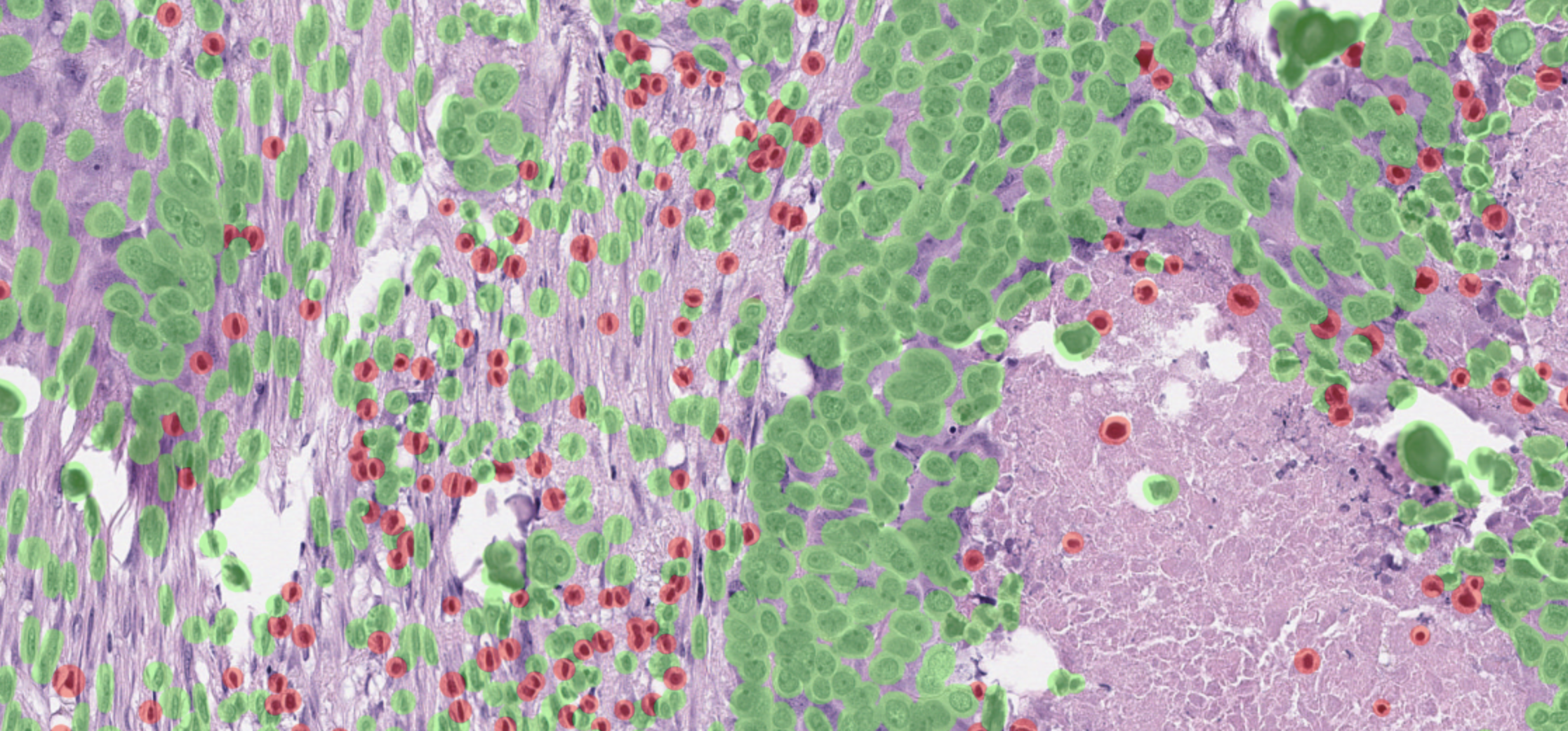
This is a screenshot form HistomicsUI, the high-magnification viewer. You can zoom in and view your annotation results with the desired opacity. As specified in dsa_configs/stardist_polygon_config.yaml, the red objects are classified as lymphocytes and the green cells are “other” cells.
Upload Stardist cell detection results#
Here we use cellular detection results generated from Stardist. The x,y coordinates of the cells in the input TSV file will be visualized as a point, as opposed to a more complex polygon that we saw in the previous step with stardist-polygon. You’ll notice that the point annotation is faster to upload compared to the polygon represenation of the cells.
We also set fill color alpha value to 0 makes annotation upload faster.
[26]:
# generate DSA annotation
!dsa stardist-cell \
../dsa_input/test_object_detection.tsv \
--output_dir ../dsa_annotations/stardist_cell \
--annotation_name stardist_cell_segmentations \
--image_filename 123.svs \
--line_colors '{"Other": "rgb(0,255,0)", "Lymphocyte": "rgb(255,0,0)"}' \
--fill_colors '{"Other": "rgba(0,255,0,100)", "Lymphocyte": "rgba(255,0,0,100)"}'
2022-04-05 09:19:48,224 - INFO - root - FYI: Initalized logger, log file at: data-processing.log with handlers: [<StreamHandler <stderr> (INFO)>, <RotatingFileHandler /Users/rosed2/Documents/msk-mind/luna/docker/luna_tutorial/vmount/notebooks/data-processing.log (INFO)>]
2022-04-05 09:19:48,225 - INFO - luna.common.utils - Running <function stardist_cell_main at 0x13c902550> with {'output_dir': '../dsa_annotations/stardist_cell', 'annotation_name': 'stardist_cell_segmentations', 'image_filename': '123.svs', 'line_colors': '{"Other": "rgb(0,255,0)", "Lymphocyte": "rgb(255,0,0)"}', 'fill_colors': '{"Other": "rgba(0,255,0,100)", "Lymphocyte": "rgba(255,0,0,100)"}', 'input': '../dsa_input/test_object_detection.tsv', 'method_param_path': None}
2022-04-05 09:19:48,225 - INFO - luna.common.utils - Param fill_colors set = {'Other': 'rgba(0,255,0,100)', 'Lymphocyte': 'rgba(255,0,0,100)'}
2022-04-05 09:19:48,225 - INFO - luna.common.utils - Param line_colors set = {'Other': 'rgb(0,255,0)', 'Lymphocyte': 'rgb(255,0,0)'}
2022-04-05 09:19:48,226 - INFO - luna.common.utils - Param annotation_name set = stardist_cell_segmentations
2022-04-05 09:19:48,226 - INFO - luna.common.utils - Param image_filename set = 123.svs
2022-04-05 09:19:48,226 - INFO - luna.common.utils - Param output_dir set = ../dsa_annotations/stardist_cell
2022-04-05 09:19:48,226 - INFO - luna.common.utils - Param input set = ../dsa_input/test_object_detection.tsv
2022-04-05 09:19:48,226 - INFO - luna.common.utils - Full segment key set: {}

----------------------------------- Running transform::stardist_cell_main -----------------------------------

2022-04-05 09:19:48,231 - INFO - luna.common.utils - Code block 'transform::stardist_cell_main' took: 0.004638240000000016s
2022-04-05 09:19:48,232 - INFO - luna.common.utils - Done.
[27]:
# check json annotation
!head ../dsa_annotations/stardist_cell/stardist_cell_segmentations_123.json
{"description": "", "elements": [{"fillColor": "rgba(0,255,0,100)", "lineColor": "rgb(0,255,0)", "lineWidth": 2, "type": "point", "center": [61788.06625424067, 953.4224705647575, 0], "label": {"value": "Other"}}, {"fillColor": "rgba(0,255,0,100)", "lineColor": "rgb(0,255,0)", "lineWidth": 2, "type": "point", "center": [63033.92536419876, 957.214128916384, 0], "label": {"value": "Other"}}, {"fillColor": "rgba(0,255,0,100)", "lineColor": "rgb(0,255,0)", "lineWidth": 2, "type": "point", "center": [64150.069846338054, 957.3538215924966, 0], "label": {"value": "Other"}}], "name": "stardist_cell_segmentations"}
[29]:
# push annotation to DSA
!dsa_upload http://localhost:8080/dsa/api/v1 \
--collection_name tcga-data \
--image_filename 123.svs \
--annotation_filepath ../dsa_annotations/stardist_cell/stardist_cell_segmentations_123.json
Successfully connected to DSA.
collection_id_dict {'_accessLevel': 2, '_id': '60807410150bd39c9df579cf', '_modelType': 'collection', '_textScore': 15.75, 'created': '2021-04-21T18:50:56.730000+00:00', 'description': 'test images', 'meta': {}, 'name': 'test-path', 'public': True, 'publicFlags': [], 'size': 936444465, 'updated': '2021-04-21T18:50:56.730000+00:00'}
Collection test-path found with id: 60807410150bd39c9df579cf
Annotation successfully pushed to DSA.
Time to push annotation 202.15096521377563
http://localhost:8080/histomics#?image=60807ad8150bd39c9df579d2
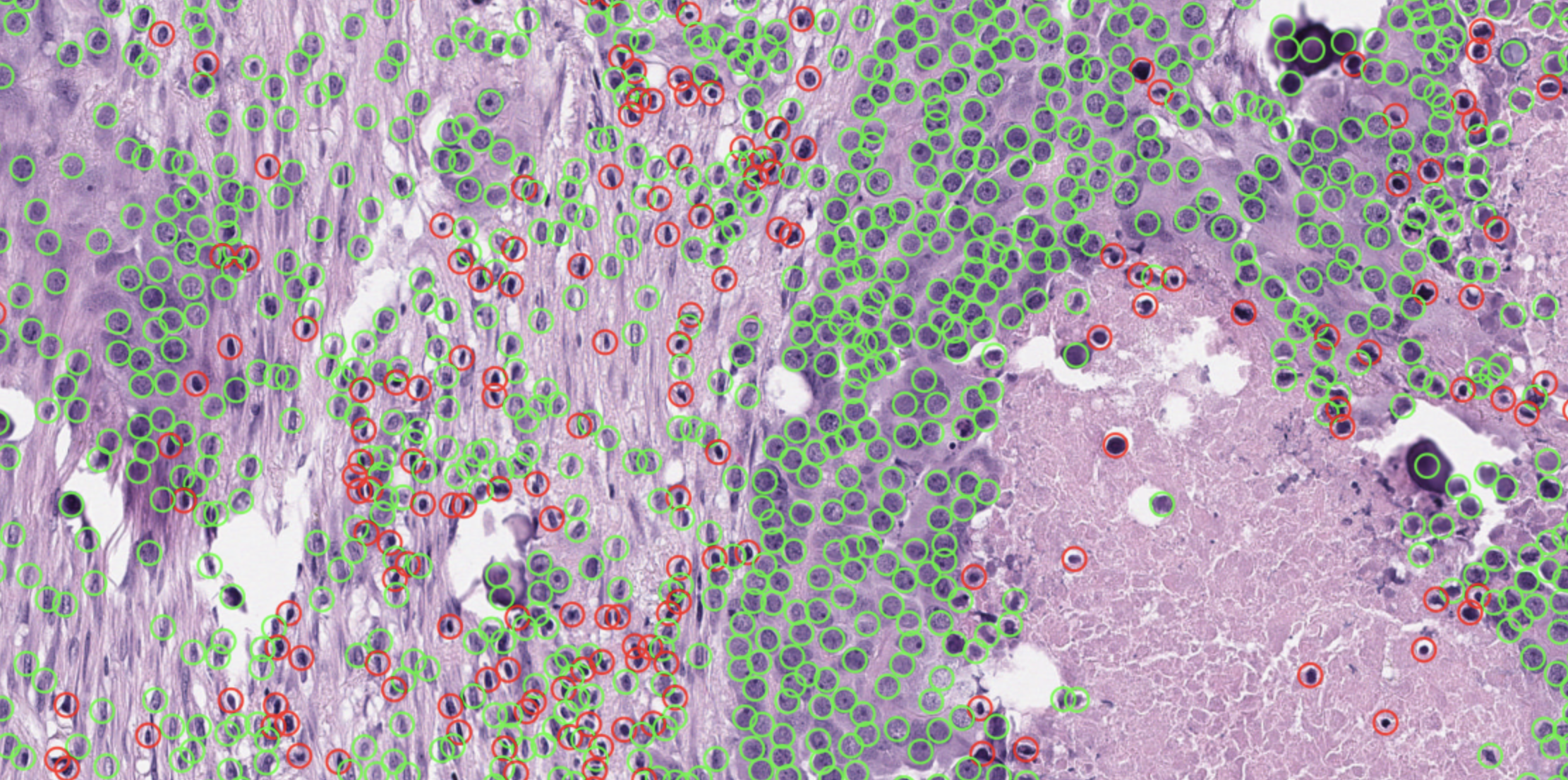
Below is another screenshot from HistomicsUI, from the link printed above. The results are the same as stardist-polygon visualization. Notice the cells are captured more minimally as circles, and not polygons. For rapid prototyping, stardist-cell offers faster annotation upload speed compared to stardist-polygon.
Congratulations! Now you can visualize your annotations and results on DSA platform.
[ ]: