DSA Annotation
Contents
DSA Annotation#
Digital Slide Archive (DSA) is an open-source web application where users can annotate regional and point annotations on the high power slide viewer. Luna Pathology CLIs pull the different annotation types from DSA, and save the annotations in GeoJSON format along with metadata. In this notebook, we will review:
Project setup on DSA
Create annotations on DSA
Run regional annotation ETL
Run point annotation ETL
DSA provides an excellent video tutorial that covers platform features. For the first two points on DSA, the information below is an abridged version of the tutorial for your reference.
Project setup on DSA#
Digital Slide Archive (DSA) is a platform that provides the ability to store, manage, visualize and annotate large imaging data sets. The DSA consists of an interface to visualize slides and manage annotations (HistomicsUI), and a web-server that provides a rich API and data management tools (using Girder). This system can:
Organize images from a variety of assetstores, such as local files systems and S3.
Provide user access controls.
Image annotation and review.
HistomicsUI is a web-based application for examining, annotating, and processing histology images to extract both low and high level features (e.g. cellular structure, feature types). Concepts
Collections correspond to a project. Collections are at the top level objects in the data organization hierarchy.
Folders help organize slides under a project. e.g. hne_slides
Items correspond to a slide. An item can have metadata, annotations and files associated with it.
Annotation is a single rectangle, point, or polygon
Annotation Document is a set of annotations, created by the pathologist.
Annotation Style is a predefined set of labels (morphology like tumor, stroma, necrosis etc) and colors.
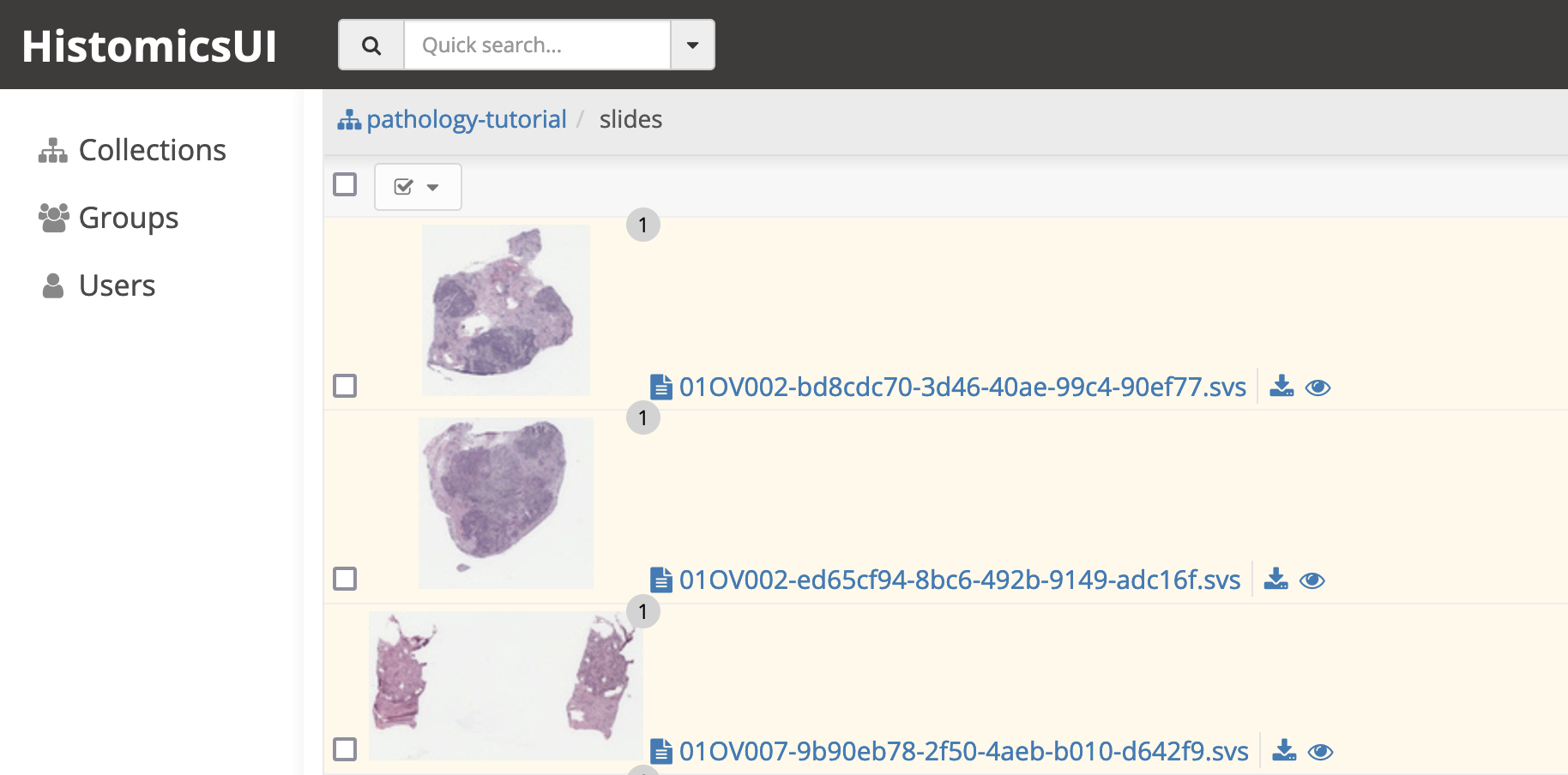
Create a collection for your project. Your images can be organized in a folder. In this example, we have a pathology-tutorial collection with slides folder where we organized the images.
Create annotations on DSA#
Please see this video tutorial for creating and viewing annotations. The information below is an abridged version of the tutorial for your reference.
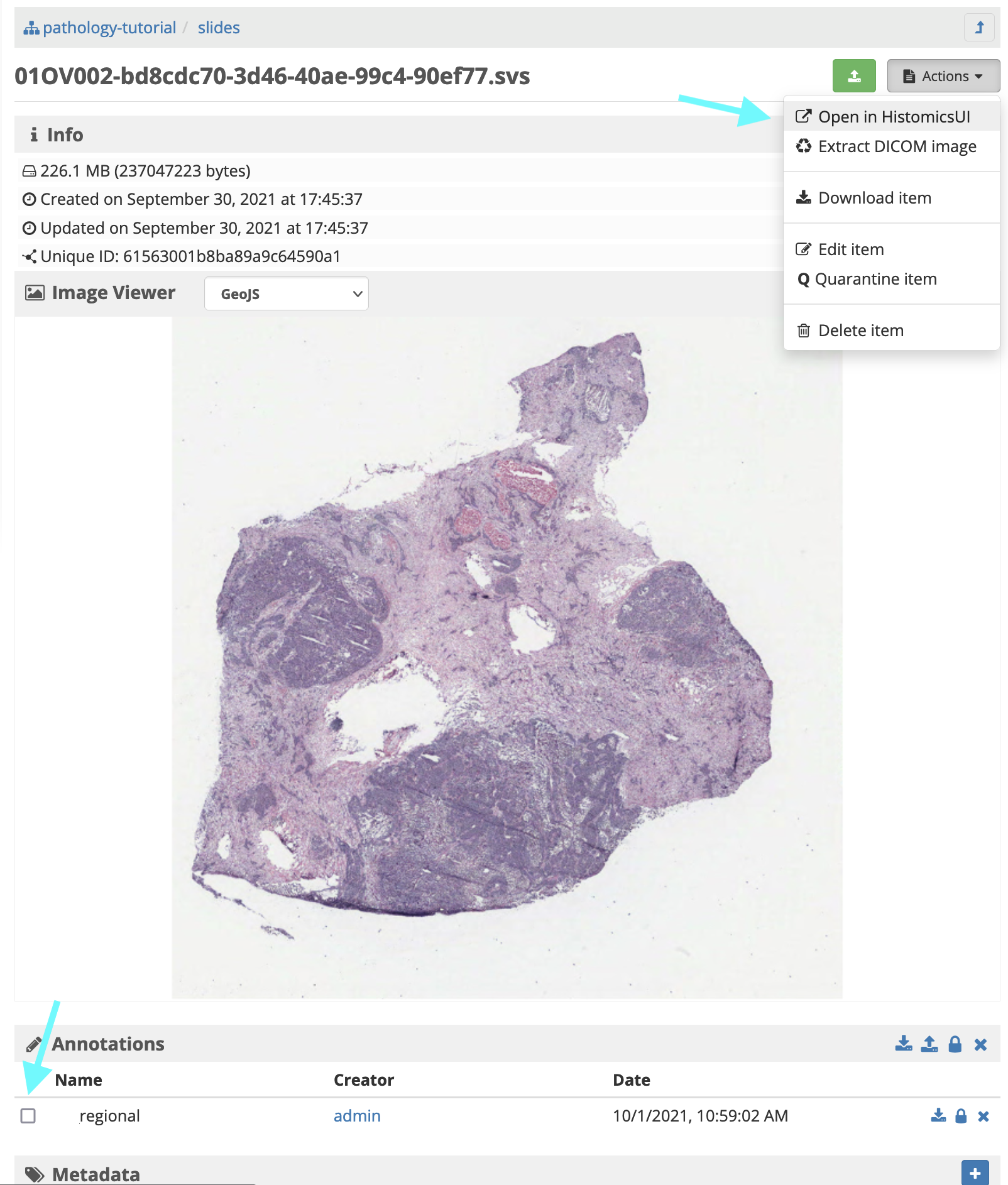
1. To navigate to HistomicsUI, go to the Actions → Open in HistomicsUI on the upper right side. HistomicsUI will open a new tab in your browser.
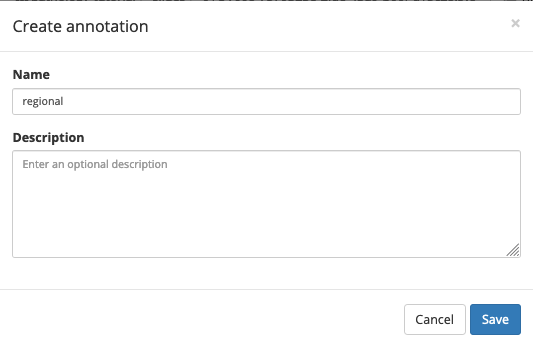
2. Create an annotation document - Click on the + New button on the Annotation panel. This will bring up a Create annotation modal. - Name you annotation document regional or point. These are the two types of annotations we support. The annotation document name will be used in the ETL, it is important to standardize your document names so the ETL can download all documents for the annotation type. - Optionally add a description, then click save.
3. Create annotations
Select a label (e.g. regional_tumor)
Click on Point or Polygon. When an annotation shape is highlighted, then your cursor on the slide area will look like a +
For Point annotation, zoom to an appropriate magnification and click on the cell. The annotation will appear as a circle.
For Polygon annotation, click and drag your mouse. As you drag the area will be highlighted. Try to meet the starting point, or double click to close the polygon.
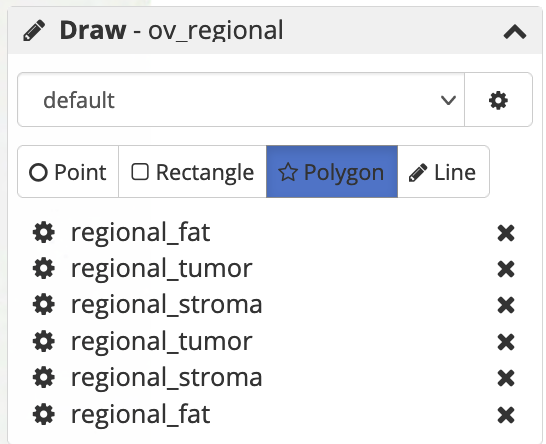
Note: Using standardized annotation styles is recommended. A uniform annotation style json can be created and shared among the pathologists making annotations.
Run regional annotation ETL#
[1]:
# TEMP
%env LUNA_HOME=/gpfs/mskmind_emc/data_user/rosed2/luna
#%env PYTHONPATH=/gpfs/mskmind_emc/data_user/rosed2/luna/pyluna-pathology:/gpfs/mskmind_emc/data_user/rosed2/luna/pyluna-common/luna
env: LUNA_HOME=/gpfs/mskmind_emc/data_user/rosed2/luna
Once you have created annotations on DSA, we can run the annotation ETL CLI! This ETL will download the annotations, convert them to GeoJSON format, and create a parquet table to make the annotations and metadata queryable.
For details of the data and app configuration, please refer to the example configurations.
Note: details of your DSA instance should be updated to reflect your DSA setup. If you are using the luna tutorial docker, replace the localhost with the IP you get from running:
docker inspect -f '{{range.NetworkSettings.Networks}}{{.IPAddress}}{{end}}' luna_tutorial_girder_1
First, let’s look at the CLI arguments, by running --help
[11]:
!dsa_annotation --help
2022-04-06 21:21:30,463 - INFO - root - Initalized logger, log file at: data-processing.log
Usage: dsa_annotation [OPTIONS] INPUT_DSA_ENDPOINT

  A cli tool

  Inputs:
      input_dsa_endpoint: Path to the DSA endpoint like http://localhost:8080/dsa/api/v1

  Outputs:
      slide_annotation_dataset

  Example:
      export DSA_USERNAME=username
      export DSA_PASSWORD=password
      dsa_annotation_etl http://localhost:8080/dsa/api/v1
          --collection_name tcga-data
          --annotation_name TumorVsOther
          -o /data/annotations/

Options:
  -o, --output_dir TEXT         path to output directory to save results
  -c, --collection_name TEXT    name of the collection to pull data from in
                                DSA

  -a, --annotation_name TEXT    name of the annotations to pull from DSA (same
                                annotation name for all slides)

  -u, --username TEXT           DSA username, can be inferred from
                                DSA_USERNAME

  -p, --password TEXT           DSA password, should be inferred from
                                DSA_PASSWORD

  -nc, --num_cores INTEGER      Number of cores to use (default: 4)
  -m, --method_param_path TEXT  path to a metadata json/yaml file with method
                                parameters to reproduce results

  --help                        Show this message and exit.
[10]:
# ingest annotations
!dsa_annotation http://localhost:8080/api/v1 \
--output_dir ../dsa_annotations \
--collection_name tcga \
--annotation_name test \
--num_cores 1 \
--username admin --password password
2022-04-06 21:20:59,193 - INFO - root - Initalized logger, log file at: data-processing.log
2022-04-06 21:20:59,195 - INFO - luna.common.utils - Running <function dsa_annotation_etl at 0x7f3b987ac510> with {'output_dir': '../dsa_annotations', 'collection_name': 'tcga', 'annotation_name': 'test', 'num_cores': 1, 'username': 'admin', 'password': 'password', 'input_dsa_endpoint': 'http://localhost:8080/api/v1', 'method_param_path': None}
2022-04-06 21:20:59,196 - INFO - luna.common.utils - Param input_dsa_endpoint set = http://localhost:8080/api/v1
2022-04-06 21:20:59,196 - INFO - luna.common.utils - Param collection_name set = tcga
2022-04-06 21:20:59,196 - INFO - luna.common.utils - Param annotation_name set = test
2022-04-06 21:20:59,197 - INFO - luna.common.utils - Param num_cores set = 1
2022-04-06 21:20:59,197 - INFO - luna.common.utils - Param username set = *****
2022-04-06 21:20:59,197 - INFO - luna.common.utils - Param password set = *****
2022-04-06 21:20:59,197 - INFO - luna.common.utils - Param output_dir set = ../dsa_annotations
http://localhost:8080/api/v1/metadata.yml
2022-04-06 21:20:59,198 - INFO - luna.common.utils - Full segment key set: {}

----------------------------------- Running transform::dsa_annotation_etl -----------------------------------

2022-04-06 21:20:59,499 - INFO - luna.pathology.dsa.dsa_api_handler - Connected to DSA @ http://localhost:8080/api/v1/
2022-04-06 21:20:59,558 - INFO - numexpr.utils - Note: detected 160 virtual cores but NumExpr set to maximum of 64, check "NUMEXPR_MAX_THREADS" environment variable.
2022-04-06 21:20:59,558 - INFO - numexpr.utils - Note: NumExpr detected 160 cores but "NUMEXPR_MAX_THREADS" not set, so enforcing safe limit of 8.
2022-04-06 21:20:59,558 - INFO - numexpr.utils - NumExpr defaulting to 8 threads.
2022-04-06 21:20:59,562 - INFO - luna.pathology.dsa.dsa_api_handler - Found collection id=610acb50150bd39c9d5e49e2 for collection=tcga
2022-04-06 21:20:59,582 - INFO - luna.pathology.dsa.dsa_api_handler - Found 2 slides!
2022-04-06 21:21:07,009 - INFO - root - Initalized logger, log file at: data-processing.log
2022-04-06 21:21:07,147 - INFO - dsa_annotation_etl - Dashboard: http://10.254.130.15:8787/status
2022-04-06 21:21:07,156 - INFO - dsa_annotation_etl - Trying to process annotation for slide_id=123, item_id=624c33a8150bd39c9d7ae182
2022-04-06 21:21:07,157 - INFO - dsa_annotation_etl - Trying to process annotation for slide_id=TCGA-GM-A2DB-01Z-00-DX1.9EE36AA6-2594-44C7-B05C-91A0AEC7E511, item_id=610ad128150bd39c9d5e49e5
2022-04-06 21:21:07,193 - INFO - luna.pathology.dsa.dsa_api_handler - Found 1 total annotations: {'otsu_score_tile-based heatmap'}
2022-04-06 21:21:07,196 - INFO - luna.pathology.dsa.dsa_api_handler - Found 1 total annotations: {'test'}
2022-04-06 21:21:07,210 - INFO - numexpr.utils - Note: detected 160 virtual cores but NumExpr set to maximum of 64, check "NUMEXPR_MAX_THREADS" environment variable.
2022-04-06 21:21:07,211 - INFO - numexpr.utils - Note: NumExpr detected 160 cores but "NUMEXPR_MAX_THREADS" not set, so enforcing safe limit of 8.
2022-04-06 21:21:07,211 - INFO - numexpr.utils - NumExpr defaulting to 8 threads.
2022-04-06 21:21:07,218 - WARNING - luna.pathology.dsa.dsa_api_handler - No matching annotation 'test'
2022-04-06 21:21:07,220 - INFO - luna.pathology.dsa.dsa_api_handler - Found an annotation called test!!!!
       annotation_girder_id  ...                                           y_coords
0  624c33ba150bd39c9d7ae186  ...  [2038, 1989, 1976, 1973, 1989, 2138, 2202, 220...
1  624c33ba150bd39c9d7ae186  ...  [1170, 1164, 1144, 1125, 1115, 1102, 1070, 102...

[2 rows x 26 columns]
2022-04-06 21:21:07,287 - INFO - dsa_annotation_etl - About to turn 2 geometric annotations into a geojson!
2022-04-06 21:21:07,290 - INFO - dsa_annotation_etl -   Created geometry POLYGON ((1203 2038, 1255 1989, 1271 197...
2022-04-06 21:21:07,290 - INFO - dsa_annotation_etl -   Created geometry POLYGON ((1235 1170, 1200 1164, 1168 114...
2022-04-06 21:21:07,291 - INFO - dsa_annotation_etl - Checking geojson, errors with geojson FeatureCollection: []
                               _id  ... annotation_name
slide_id                            ...
123       624c33a8150bd39c9d7ae182  ...            test
123       624c33a8150bd39c9d7ae182  ...            test
123       624c33a8150bd39c9d7ae182  ...            test

[3 rows x 40 columns]
2022-04-06 21:21:08,858 - INFO - dsa_annotation_etl - Created 1 geojsons, 0 points, and 2 polygons
2022-04-06 21:21:09,160 - INFO - luna.common.utils - Code block 'transform::dsa_annotation_etl' took: 9.961238082963973s
2022-04-06 21:21:09,162 - INFO - luna.common.utils - Done.
[14]:
# metadata, geojson, parquet table output
!ls -lh ../dsa_annotations/
total 33K
-rw-rw-r-- 1 rosed2 rosed2 1.2K Apr  6 21:21 123.annotation.geojson
-rw-rw-r-- 1 rosed2 rosed2  290 Apr  6 21:21 metadata.yml
-rw-rw-r-- 1 rosed2 rosed2  29K Apr  6 21:21 slide_annotation_dataset_tcga_test.parquet
Annotations are saved in a parquet format, where 1 row represents an annotation element.
We collect metadata about the annotation such as created timestamp and user. Note that different annotation types (point, regional) can be ingested using the same CLI
[19]:
# check annotation metadata table
import pyarrow.parquet as pq

annotation_table = pq.read_table('../dsa_annotations/slide_annotation_dataset_tcga_test.parquet').to_pandas()
print(annotation_table.columns)
annotation_table
Index(['_id', 'baseParentId', 'baseParentType', 'created', 'creatorId',
       'description', 'folderId', 'largeImage', 'lowerName', 'name', 'size',
       'updated', 'annotation_girder_id', '_modelType', '_version',
       'createdannotation', 'creatorIdannotation', 'public',
       'updatedannotation', 'updatedId', 'groups', 'element_count',
       'element_details', 'annidx', 'elementidx', 'element_girder_id', 'type',
       'group_name', 'label', 'color', 'xmin', 'xmax', 'ymin', 'ymax',
       'bbox_area', 'x_coords', 'y_coords', 'slide_geojson', 'collection_name',
       'annotation_name'],
      dtype='object')
[19]:
| _id | baseParentId | baseParentType | created | creatorId | description | folderId | largeImage | lowerName | name | ... | xmin | xmax | ymin | ymax | bbox_area | x_coords | y_coords | slide_geojson | collection_name | annotation_name | |
|---|---|---|---|---|---|---|---|---|---|---|---|---|---|---|---|---|---|---|---|---|---|
| slide_id | |||||||||||||||||||||
| 123 | 624c33a8150bd39c9d7ae182 | 610acb50150bd39c9d5e49e2 | collection | 2022-04-05T12:18:48.428000+00:00 | 608072ed93e6d1c34ffe27b2 | 610acb5f150bd39c9d5e49e3 | {'fileId': '624c33a8150bd39c9d7ae183', 'source... | 123.svs | 123.svs | ... | 1171.0 | 1345.0 | 1973.0 | 2202.0 | 39846.0 | [1203, 1255, 1271, 1287, 1345, 1329, 1238, 120... | [2038, 1989, 1976, 1973, 1989, 2138, 2202, 220... | None | tcga | test | |
| 123 | 624c33a8150bd39c9d7ae182 | 610acb50150bd39c9d5e49e2 | collection | 2022-04-05T12:18:48.428000+00:00 | 608072ed93e6d1c34ffe27b2 | 610acb5f150bd39c9d5e49e3 | {'fileId': '624c33a8150bd39c9d7ae183', 'source... | 123.svs | 123.svs | ... | 1077.0 | 1461.0 | 783.0 | 1193.0 | 157440.0 | [1235, 1200, 1168, 1148, 1132, 1116, 1100, 108... | [1170, 1164, 1144, 1125, 1115, 1102, 1070, 102... | None | tcga | test | |
| 123 | 624c33a8150bd39c9d7ae182 | 610acb50150bd39c9d5e49e2 | collection | 2022-04-05T12:18:48.428000+00:00 | 608072ed93e6d1c34ffe27b2 | 610acb5f150bd39c9d5e49e3 | {'fileId': '624c33a8150bd39c9d7ae183', 'source... | 123.svs | 123.svs | ... | NaN | NaN | NaN | NaN | NaN | None | None | ../dsa_annotations/123.annotation.geojson | tcga | test |
3 rows × 40 columns
[ ]: